

Sunday, 6 November 2011

Info : 100 Keyboard Shortcuts Yang Memudahkan Anda

Korang mesti tau keyboard shortcuts kan? Ala.. takkan tak tau CTRL + C, CTRL + V.. Copy paste.. Student konpem terer copy paste.. Tapi ada banyak lagi shortcuts yang mungkin korang tak tau.. Ni aku nak share..
The General Shortcuts
- CTRL+C (Copy)
- CTRL+X (Cut)
- CTRL+V (Paste)
- CTRL+Z (Undo)
- Delete (Delete)
- Shift+Delete (Delete the selected item permanently without placing the item in the Recycle Bin)
- CTRL while dragging an item (Copy the selected item)
- CTRL+Shift while dragging an item (Create a shortcut to the selected item)
- F2 key (Rename the selected item)
- CTRL+RIGHT ARROW (Move the insertion point to the beginning of the next word)
- CTRL+LEFT ARROW (Move the insertion point to the beginning of the previous word)
- CTRL+DOWN ARROW (Move the insertion point to the beginning of the next paragraph)
- CTRL+UP ARROW (Move the insertion point to the beginning of the previous paragraph)
- CTRL+Shift with any of the arrow keys (Highlight a block of text)
- Shift with any of the arrow keys (Select more than one item in a window or on the desktop, or select text in a document)
- CTRL+A (Select all)
- F3 key (Search for a file or a folder)
- Alt+Enter (View the properties for the selected item)
- Alt+F4 (Close the active item, or quit the active program)
- Alt+Enter (Display the properties of the selected object)
- Alt+Spacebar (Open the shortcut menu for the active window)
- CTRL+F4 (Close the active document in programs that enable you to have multiple documents open simultaneously)
- Alt+Tab (Switch between the open items)
- Alt+ESC (Cycle through items in the order that they had been opened)
- F6 key (Cycle through the screen elements in a window or on the desktop)
- F4 key (Display the Address bar list in My Computer or Windows Explorer)
- Shift+F10 (Display the shortcut menu for the selected item)
- Alt+Spacebar (Display the System menu for the active window)
- CTRL+ESC (Display the Start menu)
- Alt+Underlined letter in a menu name (Display the corresponding menu)
- Underlined letter in a command name on an open menu (Perform the corresponding command)
- F10 key (Activate the menu bar in the active program)
- RIGHT ARROW (Open the next menu to the right, or open a submenu)
- LEFT ARROW (Open the next menu to the left, or close a submenu)
- F5 key (Update the active window)
- Backspace (View the folder one level up in My Computer or Windows Explorer)
- ESC (Cancel the current task)
- Shift when you insert a CD-ROM into the CD-ROM drive (Prevent the CD-ROM from automatically playing)
Dialog Box Keyboard Shortcuts
- CTRL+Tab (Move forward through the tabs)
- CTRL+Shift+Tab (Move backward through the tabs)
- Tab (Move forward through the options)
- Shift+Tab (Move backward through the options)
- Alt+Underlined letter (Perform the corresponding command or select the corresponding option)
- Enter (Perform the command for the active option or button)
- Spacebar (Select or clear the check box if the active option is a check box)
- Arrow keys (Select a button if the active option is a group of option buttons)
- F1 key (Display Help)
- F4 key (Display the items in the active list)
- Backspace (Open a folder one level up if a folder is selected in the Save As or Open dialog box)
Microsoft Natural Keyboard Shortcuts
- Win (Display or hide the Start menu)
- Win+BREAK (Display the System Properties dialog box)
- Win+D (Display the desktop)
- Win+M (Minimize all of the windows)
- Win+Shift+M (Restore the minimized windows)
- Win+E (Open My Computer)
- Win+F (Search for a file or a folder)
- CTRL+Win+F (Search for computers)
- Win+F1 (Display Windows Help)
- Win+ L (Lock the keyboard)
- Win+R (Open the Run dialog box)
- Win+U (Open Utility Manager)
Accessibility Keyboard Shortcuts
- Right Shift for eight seconds (Switch FilterKeys either on or off)
- Left Alt+left Shift+PRINT SCREEN (Switch High Contrast either on or off)
- Left Alt+left Shift+NUM LOCK (Switch the MouseKeys either on or off)
- Shift five times (Switch the StickyKeys either on or off)
- NUM LOCK for five seconds (Switch the ToggleKeys either on or off)
- Win +U (Open Utility Manager)
Windows Explorer Keyboard Shortcuts
- END (Display the bottom of the active window)
- HOME (Display the top of the active window)
- NUM LOCK+* (Display all of the subfolders that are under the selected folder)
- NUM LOCK++ (Display the contents of the selected folder)
- NUM LOCK+- (Collapse the selected folder)
- LEFT ARROW (Collapse the current selection if it is expanded, or select the parent folder)
- RIGHT ARROW (Display the current selection if it is collapsed, or select the first subfolder)
Shortcut Keys for Character Map
- After you double-click a character on the grid of characters, you can move through the grid by using the keyboard shortcuts:
- RIGHT ARROW (Move to the right or to the beginning of the next line)
- LEFT ARROW (Move to the left or to the end of the previous line)
- UP ARROW (Move up one row)
- DOWN ARROW (Move down one row)
- PAGE UP (Move up one screen at a time)
- PAGE DOWN (Move down one screen at a time)
- HOME (Move to the beginning of the line)
- END (Move to the end of the line)
- CTRL+HOME (Move to the first character)
- CTRL+END (Move to the last character)
- Spacebar (Switch between Enlarged and Nor mal mode when a character is selected)
Microsoft Management Console (MMC) Main Window Keyboard Shortcuts
- CTRL+O (Open a saved console)
- CTRL+N (Open a new console)
- CTRL+S (Save the open console)
- CTRL+M (Add or remove a console item)
- CTRL+W (Open a new window)
- F5 key (Update the content of all console windows)
- Alt+Spacebar (Display the MMC window menu)
- Alt+F4 (Close the console)
- Alt+A (Display the Action menu)
- Alt+V (Display the View menu)
- Alt+F (Display the File menu)
- Alt+O (Display the Favorites menu)
MMC Console Window Keyboard Shortcuts
- CTRL+P (Print the current page or active pane)
- Alt+- (Display the window menu for the active console window)
- Shift+F10 (Display the Action shortcut menu for the selected item)
- F1 key (Open the Help topic, if any, for the selected item)
- F5 key (Update the content of all console windows)
- CTRL+F10 (Maximize the active console window)
- CTRL+F5 (Restore the active console window)
- Alt+Enter (Display the Properties dialog box, if any, for the selected item)
- F2 key (Rename the selected item)
- CTRL+F4 (Close the active console window. When a console has only one console window, this shortcut closes the console)
Remote Desktop Connection Navigation
- CTRL+Alt+END (Open the micro$oft Windows NT Security dialog box)
- Alt+PAGE UP (Switch between programs from left to right)
- Alt+PAGE DOWN (Switch between programs from right to left)
- Alt+INSERT (Cycle through the programs in most recently used order)
- Alt+HOME (Display the Start menu)
- CTRL+Alt+BREAK (Switch the client computer between a window and a full screen)
- Alt+Delete (Display the Windows menu)
- CTRL+Alt+- (Place a snapshot of the active window in the client on the Terminal server clipboard and provide the same functionality as pressing PRINT SCREEN on a local computer.)
- CTRL+Alt++ (Place a snapshot of the entire client window area on the Terminal server clipboard and provide the same functionality as pressing Alt+PRINT SCREEN on a local computer.)
Internet Explorer navigation
- CTRL+B (Open the Organize Favorites dialog box)
- CTRL+E (Open the Search bar)
- CTRL+F (Start the Find utility)
- CTRL+H (Open the History bar)
- CTRL+I (Open the Favorites bar)
- CTRL+L (Open the Open dialog box)
- CTRL+N (Start another instance of the browser with the same Web address)
- CTRL+O (Open the Open dialog box, the same as CTRL+L)
- CTRL+P (Open the Print dialog box)
- CTRL+R (Update the current Web page)
- CTRL+W (Close the current window)
Sumber : B
Info : Perkara Yang Berlaku Ketika Seminit Di Internet

25 Perkara yang berlaku ketika korang melayari Internet selama seminit..
- 500 lebih posting di blog
- 98,000 twit terbaru
- 12,000 iklan terbaru di craiglist
- 20,000 posting terbaru di Tumblr
- 600 video terbaru di Youtube
- 70 Domain Didaftarkan
- 13,000 Aplikasi iPhone telah didownload
- 320 Akaun Twitter terbaru
- 100 Akaun Linkedin terbaru
- 6,600 Foto dipublish di Flickr
- 125 Plugin WordPress didownload
- 50 Core WordPress didownload
- 79,364 Wall terkirim di Facebook
- 695,000 Status Facebook diupdate
- 510,040 komen di Facebook
- 1,700 Aplikasi Mozilla Firefox didownload
- 694,445 kata dicari di Google
- 168 Juta Email dikirim
- 60 Blog terbaru dibuat
- 40 Pertanyaan di Yahoo answer dan 100 jawapan diberikan
- 1,600 Orang Membaca di Scribd
- 1 perkataan ditranslate di Urban Dictonaries
- 370,000 minit telepon di Skype.
- 13,000 jam muzik streaming di Pandora
- 5,000,000,000 dokumen di seluruh dunia di selongkar (crawl) oleh robot google
p/s : Seminit yang begitu berharga di dunia maya.. tak percaya? lantak korang lah.. Hehe
Sumber: Here
Info : Rupa Bintang Bola Sepak Sewaktu Kecil (20 Gambar)
 |
| Steven Gerrard |
 |
| Frank Lampard |
 |
| Michael Ballack |
 |
| Fernando Torres |
 |
| Wayne Rooney |
 |
| Zinedine Zidane |
 |
| Ronaldinho |
 |
| Michael Owen |
 |
| Thierry Henry |
 |
| Ronaldo |
 |
| Lionel Messi |
 |
| Cristiano Ronaldo |
 |
| David Beckham |
 |
| Jose Mourinho |
 |
| Peter Cech |
 |
| Cesc Fabregas |
 |
| Deco |
 |
| Paul Scholes |
 |
| Ryan Giggs |

Sumber : BI
Berita : Sebuah Asteroid Dijangka Berlegar Antara Bumi dan Bulan

CAPE CANAVERAL (Florida) – Asteroid pada saiz lebih besar daripada pesawat pengangkut dijangka berlegar antara bumi dan bulan, Selasa depan.
Ia juga adalah penemuan asteroid pada saiz besar dan terdekat yang dikesan berdekatan bumi dalam tempoh 35 tahun.
Bagaimanapun, saintis berkata, orang ramai tidak perlu bimbang kerana ia tidak akan jatuh ke bumi.
Katanya, saintis sentiasa memantau putaran perlahan asteroid yang dikesan sejak 2005.
p/s : Sapa yang ade teleskop tu boleh la usha2 asteroid tu.. Kan best kalau jadi mcm dalam cerita Armageddon.. Hehe
Sumber: MNH
Cool : [Video] Periuk Steamboat Terbesar Dunia Di China Seluas Kolam Renang

p/s: tapi risau juga makan bersama, takut tercampur air liur atau mana tahu ada yang meludah.


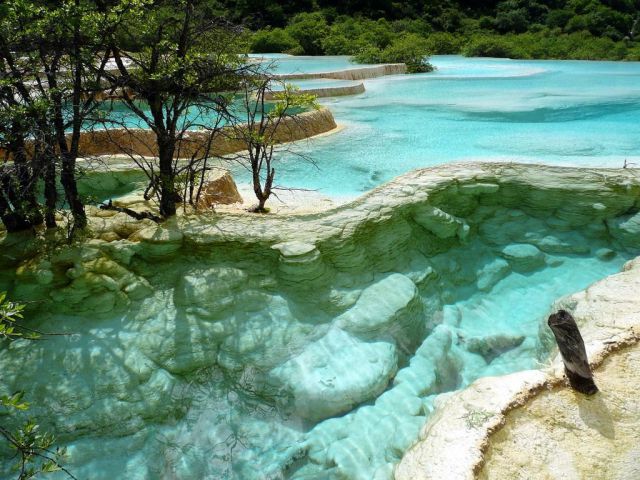
Cool : Huanlun Valley, Kolam Renang 'Emas' Semulajadi (9 Photos)
Huanlun Valley merupakan satu lokasi di mana letaknya kolam renang semulajadi. Sekiranya dipandang dari jauh, air kolam renang ini seolah-olah berwarna emas.Dengan keindahan alam flora dan fauna serta kejernihan air kolam renang ini, ramai orang pasti akan jatuh cinta.




izismile
Subscribe to:
Posts (Atom)
